
Product Design vs. UX Design: What Businesses Need Before Building

A business decides it needs an app, customer portal, internal dashboard, or digital service. The next request often sounds simple: “We need the screens designed.” But the team might still disagree on who the product is for, what problem the first release needs to solve, what features should be in the MVP, or how success will be measured.
That’s when the difference between product design and UX design comes in handy. UX design is how people move through an experience and get things done. Product design connects user needs with business objectives, feature priorities, technical constraints, and the route from concept to launch.
Both disciplines are trained in the same interface design, but they are not interchangeable. This guide walks you through what each brings to the table, when UX design is okay, when product design is the better fit, and what your business should settle before development begins.
| KEY DISTINCTION UX design makes a defined product easier to understand and use. Product design defines the product itself, including who it is for, what it should do first, and how the experience supports the business behind it. |
What Is UX Design?
UX, or user experience, is how the person experiences the product from the time they enter the product to the time they complete a task. It’s about structure, navigation, user flows, interaction logic, clartiness of content, errors, and friction.
The Nielsen Norman Group defines user experience as “all aspects of the end-user’s interaction with the company, its services, and its products.” This wide definition is important because no amount of polish on the interface can save a broken workflow. A portal may feel modern but can still be a source of customer frustration if it doesn’t allow customers to find an invoice, interpret a status, correct an error or complete a request without calling support.
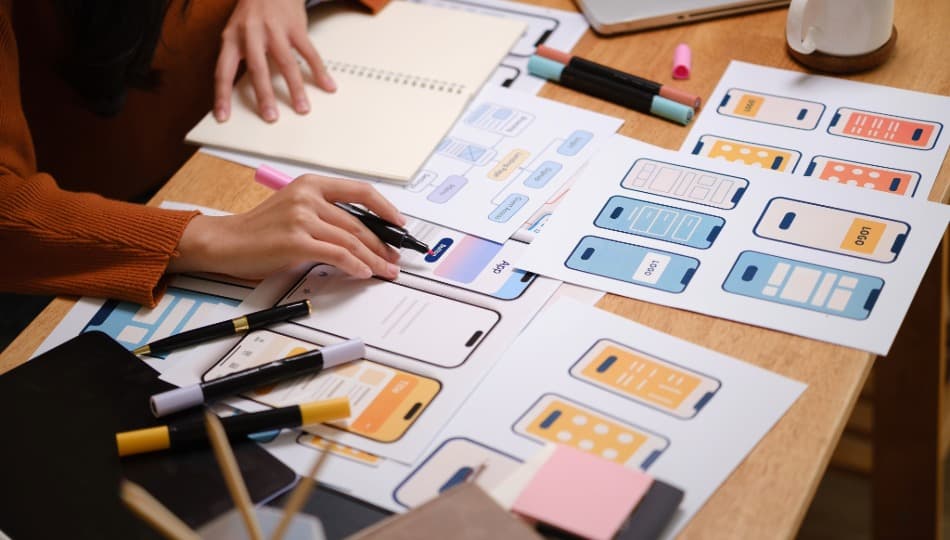
In practical project work, UX design can involve user research, experience mapping, information architecture, wireframes, clickable prototypes, usability testing, and recommendations for improving task completion. For a mobile app, that could mean cutting down the steps to post a project. For an operations dashboard, this could be showing exceptions and overdue work before the staff misses the window. For a customer portal, it may mean clarifying permissions, status messages, and next steps.
UX must consider accessibility from the beginning. The W3C recommendations for WCAG 2.2 include the following: keyboard access, focus visibility, labels, error identification, target size, and predictable navigation. It is much cheaper to use these requirements as inputs to the design process than to try and retrofit them after the interface and component system are complete.
UX design answers a focused question: can the intended user understand the experience and complete the task with a reasonable amount of effort?
What Is Product Design?
Product design incorporates UX and then amplifies that work into the decisions that decide what gets built and why. It links customer needs, business goals, product strategy, scope, interface behaviour, and delivery constraints.
Product designers might work on the same flows and prototypes as a UX designer, but the brief is often a lot more extensive. After that, engineering begins. The team might need to figure out the best product opportunity, define user roles, compare trade-offs between features, set an MVP boundary, plan how the product can grow, and decide what assumptions need validation.
Think of a new market of services. The experience has to work for customers and providers, but the questions about the product are deeper. What is a legitimate request? How do you compare quotes? Before a match, the following information must be shared: How do I cancel? And then what? When do you have safety or trust issues? What in the process needs admin tools?
Those decisions will shape the interface, the data model, the permissions, the notifications, the support process and the development budget. Product design puts them into one product plan instead of letting each department make its own assumptions.
Our Creative Design services at EspioLabs connect brand, product, UI/UX, prototyping, and build planning. That helps us move from “we need an app” to a clearer definition of the product, the users it serves, and the first release that can prove value.
Product Design vs UX Design: Where the Difference Matters
The clearest difference is scope. UX design improves the experience of using a product. Product design considers that experience in relation to the product model, business case, feature set, delivery plan, and future direction.
| Area | Product Design | UX Design |
| Primary focus | Defining the product, its value, scope, and full experience | Making a defined experience clear, usable, and efficient |
| Core questions | What should we build, for whom, why now, and what belongs in the first release? | How should users move through the product and complete the task? |
| Typical deliverables | Product requirements, role definitions, feature priorities, flows, prototypes, design direction, and delivery notes | Research findings, information architecture, wireframes, user flows, prototypes, and usability recommendations |
| Best timing | New products, unclear MVPs, multi-role systems, or major product changes | Defined products with known usability, structure, or interaction problems |
| Business value | Reduces scope ambiguity, aligns teams, and connects the build to a business case | Reduces friction, errors, abandonment, and confusion in the user experience |
The two roles often overlap. In a small team, one person may do both, and a larger product design agency may have research, UX, UI, strategy, and engineering specialists. More important than the name of the job is whether the engagement will cover the decisions your project still needs.
A buyer should not be limited to the list of deliverables. Wireframes can be useful, but don’t prove you picked the right workflow. A prototype may seem complete, but issues with permissions, integrations, or operations may remain hidden. The scope must reflect the uncertainty of the product.
What Your Business Needs to Decide Before Visual Design Begins
Visual design becomes more productive once the core product decisions are stable. Polished screens can create a false sense of confidence without that foundation. Stakeholders begin to argue about colours, spacing, and button labels before agreeing on what the product has to do.
Before high-fidelity app design services begin, define these six inputs:
- User groups. Identify the users of the product and their roles, and what each role can see and do differently. When a product has approvals, administration, reporting or account permissions, “customers” or “employees” is almost never specific enough.
- Core workflow. Map the main task from trigger to finish. Add the steps that take place outside the interface, such as a manager looking at a request, a system sending data, or a support team resolving an exception.
- Success metric. See what better performance looks like. It could be a higher task-completion rate, a lower level of support calls, faster processing, a higher number of completed applications, lower error rates, or stronger repeat use.
- MVP scope. Select the smallest useful release that solves the core problem. An MVP is not a random collection of cheap features. It needs to form a complete, testable workflow for a defined user.
- Platform or channel. Know where the work is done. A browser might be good for a portal or a data-heavy admin tool. If a mobile app’s core features include camera use, location, notifications, repeat access, or offline work, then a mobile app may be justified. We cover this decision in more depth in our guide to choosing a web app or mobile app.
- Technical constraints. Surface integrations, data sources, privacy requirements, device needs, accessibility requirements, security controls, and internal systems before the interface promises behaviour that will be difficult to deliver.
| A PRACTICAL PRE-BUILD SEQUENCE Clarify the problem > Map the users > Define the workflow > Prioritize the first release > Prototype > Test > Prepare the handoff |
| PLAN BEFORE YOU BUILD Planning an app, portal, or platform with unresolved product questions? Our creative design team can help define the requirements, user flows, interface direction, and prototype before development begins. |
When UX Design Is Enough
The business knows the users, the system already works, and the problem is focused on how people flow through the interface.
In cases where users are unable to find information, leave a form, experience confusion navigating, repeat errors, or take too many steps to complete a known task, a targeted UX engagement may be sufficient. The work can study the current experience, discover friction, redesign the flow, test a prototype, and prepare clearer interaction specifications.
This is par for the course for a portal refresh, checkout improvement, onboarding redesign, or dashboard reorganization. The product doesn’t need to be redefined. It needs better structure, clearer feedback, and a more usable path through existing capabilities.
Product questions can still come out of UX work. If the tests show that the feature set did not solve the user’s problem, it should expand. A narrow UX brief should not be an excuse to ignore evidence that the product needs work.
When Product Design Is Needed
If the business is still figuring out what the product should be, how the first version should work, or how to prioritize competing needs, product design is a better fit.
Look for these signs:
- The MVP is unclear. Stakeholders have a long feature list, but no shared view of the smallest release that produces a useful outcome.
- The product serves several roles. Customers, staff, administrators, partners, and managers may need separate workflows, permissions, and views.
- The workflow crosses systems or departments. The visible interface depends on approvals, integrations, data ownership, notifications, or work performed by another team.
- Feature decisions change cost or launch risk. Offline access, real-time data, automation, payments, location services, advanced reporting, or AI functions can reshape the architecture and testing plan.
- The business model affects the experience. Pricing, access levels, service boundaries, trust rules, and support responsibilities need to appear in the product logic.
Our work on the QTP marketplace shows why this broader view matters. The product had to support homeowners and local helpers, keep the service easy to understand, define different product flows, and connect the app experience with the brand and launch messaging. That was not a screen-design exercise. It was a product, design, and delivery problem.
How Product Design Reduces Build Risk
Development becomes expensive when teams use code to discover decisions that could have been settled through research, mapping, prototyping, and focused technical review. Product design reduces that risk in four practical ways.
It Exposes Ambiguity Before Code Is Written
A request like “users need a dashboard” seems obvious until the team asks Which users?” and “Which decisions does the dashboard support?” Which data is trusted, and What action follows each insight. Product work turns fuzzy requests into defined behaviours and acceptance criteria.
It Turns Assumptions Into Testable Flows
A clickable prototype allows users and stakeholders to experience the critical path prior to engineering building it. The team can test labels, sequence, permissions, handoffs, edge cases.
A prototype is much easier to change than a finished feature that requires rebuilding of the front-end, back-end, data, and testing work.
It Gives Every Team the Same Product Reference
Product design creates common reference points, user flows, decisions on scope, prototypes, component behaviour, content rules, and technical notes.
They reduce the chance that design, development, marketing, and operations are working from different interpretations of the product.
It Keeps the MVP Connected to the Business Case
Scope control is more powerful if you link each major feature to a user problem, business goal, or operational requirement. Any features that don’t support the first-release case can be pushed out to a later phase without diluting the core experience.
Design Should Clarify What to Build, Not Just How It Looks
Useful digital experiences are the result of both UX design and product design. UX design is about how people understand and do tasks in the product. Product design ties that experience to larger decisions about users, value, scope, technology, operations, and launch.
The correct choice depends on what is already known. A product that has a usability problem may need focused UX design services. Before a team starts writing polished interfaces or production code for a new app, portal or platform, or a substantial redesign, product design is usually required.
At EspioLabs, we help businesses translate early concepts and complex workflows to clear product requirements, user flows, prototypes, and build-ready direction. Contact EspioLabs to plan the product design woportal,t should happen before development starts.