
What Do UI/UX Design Services Include?
Are you hiring a design partner to make a website or app look better? Or do you need help making the experience easier to understand and use? When businesses come to us about UI/UX design, the first thing we do is make that distinction clear. It has a direct impact on the work we propose, the questions we ask, and the files developers get.
At EspioLabs, our UI/UX design services go beyond just colours, typography, and smooth screens. We link user needs, business goals, content structure, interaction patterns, accessibility, and technical constraints. This gives the project team a proven plan for how people will navigate through the product and complete key tasks.
This guide covers what is typically included in UI/UX design services, how the key deliverables interact, and when you may want to seek design help outside your organization. We want to help you better compare proposals with an eye toward what is in scope
What Is UI and UX Design?
UX, or User Experience Design, defines the structure and behaviour of a digital experience. It looks at what users are trying to do, what information they need, how many steps a task involves, and where confusion can arise. We use user interface design, or UI, to shape the visual and interactive layer people see and work with.
| Discipline | Primary focus | Typical questions |
| UX design | Task flow, information structure, usability and user needs | Can users find the right feature? Is the process clear? Where might they hesitate or make an error? |
| UI design | Layout, hierarchy, typography, colour, components and interaction feedback | Can users recognize what is clickable? Is the most important action visually clear? Do component states remain consistent? |
| UI and UX together | A coherent experience that works logically and communicates visually | Does the interface guide the user through the intended workflow without avoidable friction? |
We do not expect strong visual design to fix a confusing workflow. Even a logical workflow can be disrupted by an interface that hides important actions or doesn’t give users enough feedback. That’s why we consider UI and UX as parts of the same design process.
What Do UI/UX Design Services Usually Include?
We define the exact scope of the product, budget, timeline, and evidence already available. A new marketplace app might need more detailed discovery and prototyping than a focused enhancement to an existing customer portal. The following are areas of service we are most often engaged in.
| Service area | What the work involves | Common output |
| Discovery and research | Clarifying business goals, users, constraints and current problems | Research summary, requirements and success criteria |
| User flows | Mapping the steps users take to complete a task | Flow diagrams and task paths |
| Information architecture | Organizing pages, screens, navigation and content relationships | Sitemap, screen map or content hierarchy |
| Wireframes | Planning layout and priority before visual styling | Low-fidelity screen layouts |
| Interface design | Applying visual hierarchy, brand direction and interaction patterns | High-fidelity responsive screens |
| Prototyping | Connecting screens to simulate important interactions | Clickable prototype |
| Design system | Defining reusable components, styles and states | Component library and usage rules |
| Usability testing | Observing representative users attempt realistic tasks | Findings, priorities and design revisions |
| Developer handoff | Preparing specifications, assets, behaviour notes and review support | Organized design files and implementation guidance |
Depending on the project, we may bundle these activities in different ways, but our proposal still needs to set out the questions we will answer, the decisions the client will need to make, and the deliverables we will hand over. We combine this work with our UI/UX and creative design services, including digital product, app, and website design and development.
Discovery and User Research Set the Direction
We use discovery to take a broad request, like “redesign the portal,” and turn it into a defined design problem. We look at the business goal, the primary users, the current process, the content requirements, the technical environment, and the known constraints. Our stakeholder interviews surface conflicting assumptions early, before they become expensive screen revisions.
We do not treat every stage of research as an academic exercise. For a small or medium-sized organization, we might use customer support themes, analytics, sales feedback, short user interviews, existing journey maps, and a review of similar interaction patterns. We adapt the method to the risk of the decision and the access that users have.
We hope that our work can indicate a useful direction in design. This may include priority groups, top tasks, content required, technical limitations, and measures of success. If we can’t get the project team aligned on the primary task a user should accomplish, diving straight into polished interface design typically leads to rework.
User Flows and Information Architecture Organize the Experience
User Flows Map Decisions and Actions
A user flow shows the order of steps to complete a task. With a client portal we might map logging in, choosing an account, looking at a document, and asking for help. We could go through registration, permission requests, search, selection, and confirmation in an app.
When we map the flow, we can expose missing states and edge cases. What happens if the user enters incomplete information? Can they return to an earlier step without losing progress? What confirmation appears after an action? We resolve these decisions long before visual styling begins.
Information Architecture Defines Where Content Belongs
We use information architecture to group screens, pages, and content so users can predict where to find something. On a service website, we may define navigation, page hierarchy, and the relationship between educational content and conversion pages. On a dashboard, we may separate daily tasks from settings, administration, and reporting.
We structure the experience around user priorities rather than an internal org chart. A visitor may not know which department owns a service, but they do know the problem they want to solve. We choose labels, categories, and navigation that match that perspective.
Building a website, portal, or app?
We can help define user flows, information structure, and interface direction before the work moves into development. Review our creative design services to see how the design and build phases connect.
Wireframes, Prototypes and Interface Design Answer Different Questions
Wireframes Test Structure Before Styling
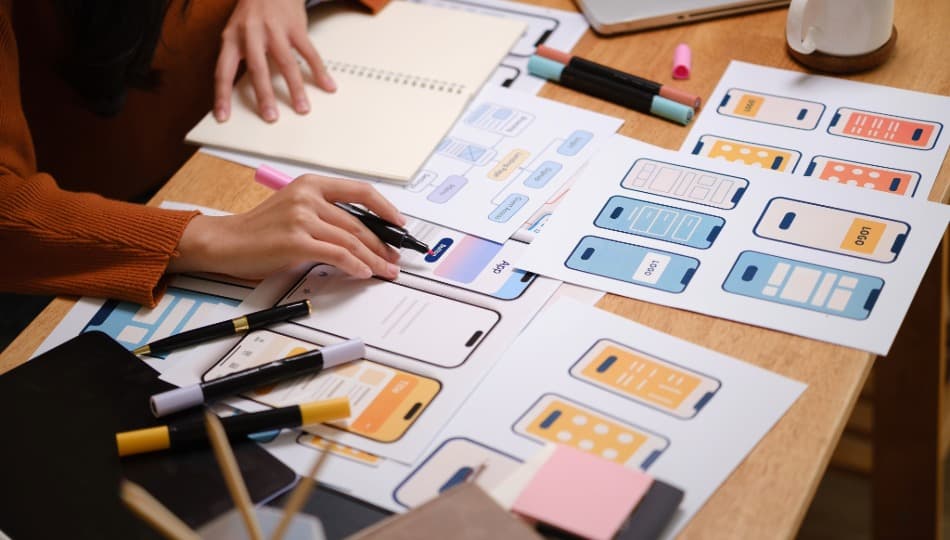
Wireframes are simple screen layouts that show content priority and controls and placement. They help us to talk about whether the right information is there at the right time, without getting distracted by colour choices or polished imagery. Our wireframes are not the final design. Viewing wireframes as finished screens can create false expectations.
Prototypes Make Important Interactions Reviewable
We use prototypes to link selected screens so stakeholders or test participants can walk through an important scenario. We could, for example, simulate booking an appointment, creating a project, comparing options, or approving a request. Depending on the project, our prototypes can be as simple as clickable wireframes or as detailed as models with realistic content and transitions.
The amount of detail we use depends on the question we are asking. We may use an early prototype to compare flow options and then a later prototype to validate labels, visual hierarchy, and interaction feedback before development starts.
Interface Design Creates the Visual and Interactive Layer
Our high-fidelity interface design work employs typography, colour, spacing, imagery, iconography, and brand cues according to the approved structure. We show the responsive behaviours and states that users see, not just ideal desktop screens. Error messages, empty states, loading feedback, validation, and mobile layouts all contribute to the experience of the interface.
Our QTP marketplace app project is a useful example of connected product-flow planning, mobile interface design, and website design and development for two distinct user groups.
Design Systems, Accessibility and Handoff Prepare the Work for Development
A Design System Keeps Repeated Elements Consistent
We use a design system in our project to define reusable interface elements such as buttons, fields, cards, alerts, navigation, and modal windows. We document how elements look and behave across sizes and states. The official Material Design guidance on interaction explains why components need to have more than one static appearance.
We will adjust the depth on the product. For a small marketing website, we might build a small component library. For a growing software platform, we might define more general rules for variants, permissions, data display, and complex states. We want consistent implementation and easier future expansion, not documentation that exists just for the sake of it.
Accessibility Must Be Considered During Design
Accessibility is taken into consideration when we decide about colour contrast, keyboard focus, labels, text resizing, target sizes, error handling, and the order of content presentation. The W3C Web Content Accessibility Guidelines provide the primary international standard for assessing web accessibility.
Our design files cannot show the final product is accessible because that is implementation. We can document the intended behaviour, identify the requirements, and prevent predictable problems from being built into the interface. We perform accessibility review throughout development and quality assurance when included in our scope.
Developer Handoff Turns Design Intent Into Build Guidance
In developer handoff, we provide organized files, component specs, responsive layouts, assets, and notes for behaviours that are not obvious from a static screen. We discuss technical limitations with developers and agree on how interaction will change in production.
We look at handoff as a working phase, not a file transfer at the end of the project. As part of development, we conduct design reviews to catch differences between the approved experience and what we have implemented. We can address missing states, spacing drift, responsive behaviour, and content changes before launch.
Usability Testing Checks Whether the Design Works for Users
In usability testing, we ask representative users to perform realistic tasks and then see where they succeed, hesitate, or fail. According to Nielsen Norman Group’s overview of usability testing, the method is used to identify design problems, uncover improvement opportunities, and learn about user behaviour and preferences.
We can test a working product, a detailed design, or an early prototype. We sort findings by impact and certainty. One participant misinterpreting a label could be a possible issue. If multiple participants fail on the same core task, the case for revision is even stronger.
Usability testing is not the same as asking stakeholders whether they like a design. Preference can be helpful, but it does not tell you whether the user is able to complete the task they intended. Behaviour gives us stronger evidence on which to base decisions about flow, labels, hierarchy, and interaction.
When Does a Business Need UI/UX Design Support?
You Are Planning a New App or Digital Product
A new product comes with many untested assumptions about users, features, and workflows. We help the team define core experience, reduce scope ambiguity, and validate important interactions before committing to a full build.
Your Website Looks Current but Does Not Guide Action
If visitors can’t quickly understand the offer or find relevant information or next step, we may suggest a redesign. Then we look at UX, content, and conversion structure, not just the visual styling. Our guide to website design services and successful business websites walks you through the bigger website elements that need to come together.
A Portal or Workflow Creates Repeated Confusion
Support tickets, abandoned forms, workarounds, and repeated staff training can be signs that a workflow doesn’t match user expectations. We switch screens to find the source, using research and task analysis.
The interface has become inconsistent.
As products gain new features, they often accumulate duplicate patterns. A design-system project can standardize components and states. But we start with an inventory of real interface needs, not a generic component library.
Development Is Starting Without Approved Flows
Design decisions happen inside the build if developers are asked to solve navigation, content priority, and interaction behaviour during implementation. Those decisions are separated; they are reviewable, and they reduce changes that are avoidable later.”
What Should a UI/UX Design Engagement Produce?
A proposal should connect activities to decisions and outputs. Before approving the scope, confirm which users and workflows we have included, what research we will complete, which screen sizes we will design, how we will handle revisions, and whether usability testing is part of the engagement.
Ask what the final handoff contains and who is responsible for implementation. We should make it clear whether we are designing only, supporting your internal development team, or completing both design and development. The answer affects timelines, responsibilities, and how we will resolve design questions once the build begins.
We focus on deliverables the project can act on. A large collection of screens has limited value if it does not cover the main tasks, responsive behaviour, component states, and development requirements. We recommend judging our scope by the decisions it supports, not by screen count alone.
Better UI/UX Design Makes the Next Action Clearer
Our UI/UX design services bring structure to the decisions between an idea and a usable digital experience. We use research to define the problem, then organize the path through user flows and information architecture. Our wireframes, prototypes, and interface designs make the solution reviewable. Testing and developer handoff help us carry that intent into the finished product.
If you are planning a website, portal, or app, we can discuss the users, workflows, and design deliverables your project may require. Discuss your UI/UX design project and outline what you are building, where users are encountering friction, and whether development support is part of the need.