

What’s the Difference Between Workflow Automation VS Business Process Automation?

Have you ever wondered why so many people treat workflow automation and business process automation as if they were the same thing? They are related, but they are not interchangeable, and thinking about this can quickly add up to be costly.
Workflow automation improves how work moves from one step to the next. It handles task routing, approvals, reminders, notifications, document handoffs, and status updates. Business process automation (or BPA) works at a broader operational level. It improves how an entire business process runs across people, departments, systems, data, rules, approvals, and reporting.
Why does this difference matter? Because the wrong approach can waste time and budget. A delayed approval may only need workflow automation. A broken client onboarding process that touches sales, finance, operations, IT, and customer success likely needs business process automation.
The simple difference is this:
- Workflow automation: improves how work moves.
- Business process automation improves how a business process runs from end to end.
This guide will walk you through the differences between the two, where they overlap, how they show up in your real operations, and, most importantly, how to confidently decide which one fits the problem your business is trying to solve.
Ready to make smarter automation decisions? Let’s dive in!
Workflow Automation vs Business Process Automation: Quick Comparison
The fastest way to understand the difference is to compare them side by side.
| Workflow Automation | Business Process Automation | |
| Main purpose | Move tasks through a defined sequence | Improve a full business process |
| Scope | Narrower | Broader |
| Typical focus | Handoffs, approvals, reminders, updates | End-to-end operations, systems, data, governance |
| Teams involved | Often, one team or function | Often multiple departments |
| Systems involved | One or a few tools | Several connected systems |
| Complexity | Low to moderate | Moderate to high |
| Common examples | Approval routing, ticket assignment, and status updates | Client onboarding, procurement, AP automation, employee onboarding |
| Best for | Reducing manual steps and delays | Improving operational performance across a process |
| Success metrics | Faster approvals, fewer missed tasks, better visibility | Lower cycle time, lower error rates, lower cost, better compliance |
A workflow is usually one path inside a larger process, whereas a business process may contain several workflows working together.
Employee onboarding is a good example. The full onboarding process may include HR paperwork, equipment setup, software access, payroll configuration, training, policy acknowledgement, and manager check-ins. Each of those areas can contain separate workflows. Automating one of those sequences is workflow automation. Automating the full employee onboarding process across HR, IT, payroll, security, and management is business process automation. We’ll get to this in a little more detail later.
What Is Workflow Automation?
Workflow automation uses software to move work through a repeatable sequence with less manual effort. It is usually built around triggers, rules, actions, and outcomes.
IBM describes “workflow automation” as replacing manual tasks with software that executes all or part of a process, often through low-code tools and rule-based logic. IBM also notes that AI can support workflow automation, but it is not required for many workflow use cases.
A trigger starts the workflow. That trigger could be:
- a form submission
- signed contract
- CRM status change
- new support ticket
- uploaded document
- due date
- or employee request.
Once the workflow begins, software can assign a task, notify a manager, update a record, send a reminder, generate a document, route an approval, or move data into another system.
The value of workflow automation often shows up in small operational gaps:
- A manager misses an approval.
- A ticket sits in the wrong queue.
- A customer record does not get updated.
- A spreadsheet becomes outdated.
- Someone forgets to notify the next person.
None of these problems may seem dramatic on their own, but repeated across hundreds of tasks, they create delays, rework, errors, and poor visibility.
Workflow automation gives structure to repeatable work. It reduces the need for people to chase updates, copy information between systems, or remember the next step each time a routine task happens.
Workflow Automation Examples
- Routing a purchase request to the right manager
- Assigning a support ticket based on category or priority
- Sending a document for approval
- Creating a project task after a form submission
- Notifying sales when a lead reaches a score threshold
- Updating a CRM record after a proposal is signed
- Sending reminders when a deadline is approaching
In most cases, workflow automation is focused. It does not require a full business redesign. It targets a clear sequence and makes that sequence faster, more consistent, and easier to track.
What Is Business Process Automation?
Business process automation is broader than workflow automation. It uses software to automate and improve larger business processes that may involve multiple teams, systems, data sources, rules, approvals, and reporting requirements.
Microsoft defines BPA as “the automation of daily, repeatable business processes that are normally completed in manual settings. ” Ranging from multilevel workflows to simple customer responses, BPA offers you the ability to complete repetitive work and convert to paperless processes quickly and efficiently. This means automating jobs that deal with an excessive amount of raw data and documentation, like product development, sales, human resources, and more. “These processes often span multiple departments and can be fully or partly automated.
A business process is not just a task. It’s basically all the activities required to produce an operational outcome, such as the following:
- onboarding a client
- processing an invoice
- fulfilling an order
- approving a vendor
- setting up a new employee
- resolving a support escalation
- or preparing a compliance package.
Because BPA deals with larger processes, it usually requires more planning than a single workflow automation project. Teams need to understand how the current process works, where delays happen, which systems are involved, who owns each step, which decisions require human review, which data fields must stay accurate, and how success will be measured.
Business process automation may include workflow automation, but it often goes further. It may connect a CRM with accounting software, a service desk with identity management, a document platform with approval workflows, or an ERP with inventory and supplier data. BPA can connect multiple enterprise IT systems and may use technologies such as RPA, workflow orchestration, BPM, AI, APIs, and cloud platforms.
Business Process Automation Examples
Business process automation examples include:
- Automating client onboarding from signed contract to billing setup, service handoff, and reporting
- Automating accounts payable from invoice capture to approval, matching, payment, and audit history
- Automating employee onboarding across HR, IT, payroll, security, and management
- Automating procurement from request intake to vendor validation, approval, purchase order creation, and invoice matching
- Automating compliance review, evidence collection, approvals, and documentation
- Automating customer support escalation from ticket intake to routing, SLA tracking, resolution, and reporting
Workflow automation handles the movement of work through a defined path. Business process automation improves the operational system around that path. Let’s take a look at a practical example to see how this might work.
A Practical Example: Client Onboarding
Client onboarding is one of the clearest examples of the difference between workflow automation and business process automation.
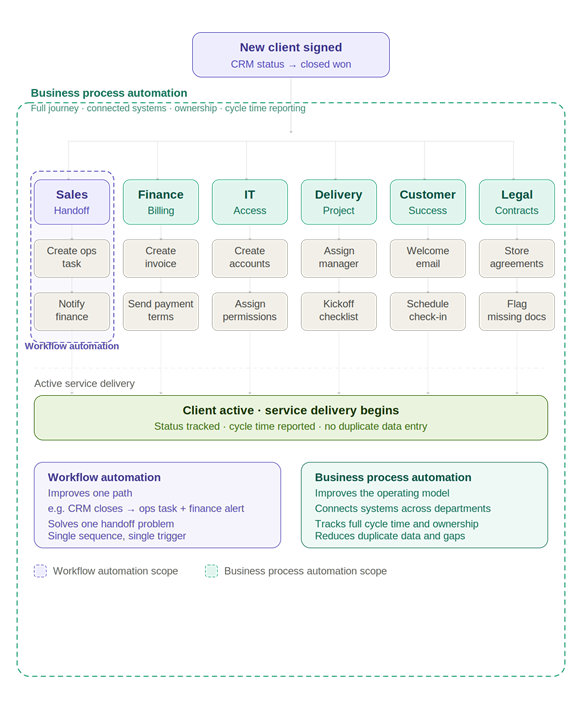
Interactive diagram comparing Workflow Automation and Business Process Automation using a client onboarding scenario. Toggle between two views: Workflow automation shows a CRM trigger splitting into two automated outputs (operations and finance), with five disconnected departments left manual. Business process automation shows the same trigger activating all seven departments in sequence, with connected systems, defined ownership, and end-to-end status tracking.
A company signs a new client. That one event can trigger a long chain of work:
- Sales needs to hand the account to operations.
- Finance needs to set up billing.
- IT may need to create access.
- The delivery team needs to assign staff.
- Customer success may need to schedule a kickoff.
- Legal may need to store contracts.
- Reporting may need to track onboarding status.
Within that larger process, there are several workflows:
- The sales handoff workflow might notify operations when a deal closes.
- The billing workflow might create an invoice and send payment terms for review.
- The IT workflow might create user accounts and assign permissions.
- The project workflow might assign a delivery manager and create a kickoff checklist.
- The customer success workflow might trigger a welcome email and schedule the first check-in.
Automating one of those sequences is workflow automation.
For example, when a CRM status changes to “closed won,” the system could create a task for the operations manager and send a notification to finance. That solves one handoff problem.
Business process automation looks at the full onboarding journey from signed agreement to active service delivery:
- It connects the relevant systems
- defines ownership across departments
- reduces duplicate data entry
- flags missing information
- tracks process status
- and reports on cycle time.
That is the real difference.
- Workflow automation improves one path.
- Business process automation improves the operating model around the full outcome.
When workflows start touching multiple teams, systems, and data sources, automation becomes more than a task-routing problem. The right AI solution can help connect processes, reduce manual handoffs, and give teams clearer visibility into what needs attention next.
Explore AI and Data solutions for businesses.
When to Choose Workflow Automation vs Business Process Automation
| Decision Area | Workflow Automation | Business Process Automation |
| Best fit | The problem is specific, repeatable, and tied to handoffs or status changes. | The issue is bigger than one workflow and affects a larger business process. |
| Use when | Work gets delayed because someone has to manually notify the next person, assign a task, send a reminder, update a record, move information between tools, or check whether a step was completed. | Several teams are involved, systems are disconnected, data quality matters, reporting is weak, compliance is involved, or the process has too many manual steps from start to finish. |
| Marketing example | A new content request automatically creates a project task, assigns a due date, notifies the content lead, and moves into review after the draft is ready. | A broader content operations process connects intake, approval, production, review, publishing, reporting, and campaign performance tracking. |
| Finance example | An expense request routes to the right manager based on department, then moves to finance after approval. | Accounts payable is automated from invoice capture to approval, purchase order matching, payment scheduling, exception handling, and audit history. |
| HR example | Interview feedback requests are sent automatically after each candidate meeting. | Employee onboarding is managed across HR, IT, payroll, security, facilities, management, and compliance. |
| Main benefit | Improves the path of work and reduces manual coordination. | Improves the full operating process across teams, systems, data, and reporting. |
| Best outcome | Faster approvals, fewer missed steps, better accountability, and quick operational wins. | Lower process cost, fewer errors, stronger compliance, better visibility, and improved customer or employee experience. |
| Rule of thumb | Choose workflow automation when the issue affects one step or one sequence. | Choose BPA when the issue affects the entire process |
Workflow Automation and BPA by Department
Different departments often need both types of automation. The difference is what problem the automation is solving.
| Department | Workflow Automation Example | Business Process Automation Example |
| HR | Send onboarding tasks after offer acceptance | Automate onboarding from signed offer to payroll setup and access provisioning |
| Finance | Route invoice approval to the right manager | Automate accounts payable from invoice capture to payment and audit trail |
| Sales | Notify a rep when a lead reaches a score threshold | Automate lead-to-customer handoff across CRM, finance, and delivery |
| IT | Assign tickets by category or priority | Automate access provisioning, deprovisioning, approvals, and audit history |
| Operations | Create tasks after a service request form is submitted | Automate service delivery tracking from intake to completion |
| Compliance | Send document review reminders | Automate evidence collection, approval, documentation, and reporting |
| Procurement | Route a purchase request for approval | Automate request, vendor check, PO creation, receiving, and invoice matching |
This is where the difference becomes practical. A department can automate workflows without fully automating the larger business process. That may be the right move for a quick win. Over time, those workflows can become building blocks within a broader BPA strategy.
Where RPA, BPM, and AI Fit
Automation language can become confusing because workflow automation and business process automation often get grouped with RPA, BPM, and AI automation.
These terms are connected, but they do different jobs.
| Term | What It Means | How It Fits |
| Workflow automation | Automates a sequence of tasks and handoffs | Useful for approvals, routing, reminders, updates, and repeatable team workflows |
| Business process automation | Automates larger business processes | Useful for end-to-end operations across departments and systems |
| RPA | Uses software bots to perform repetitive user actions | Useful when legacy systems lack modern integrations |
| BPM | Models, analyzes, improves, and manages business processes | Useful before, during, and after automation projects |
| AI automation | Uses AI for classification, extraction, summarization, prediction, and recommendations | Useful when decisions depend on documents, language, patterns, or exceptions |
BPA, RPA, and BPM are related but distinct approaches. BPA is the broader automation term for complex processes; RPA focuses on repetitive software interactions, and BPM is a wider discipline for modelling and improving processes from start to finish.
AI adds another layer. In workflow automation, AI might summarize a support ticket and recommend a routing path. In business process automation, AI might classify invoices, identify anomalies, extract information from documents, summarize contract terms, or predict where a process is likely to stall.
AI does not remove the need for process clarity. It raises the stakes. If ownership, data quality, permissions, rules, and exception handling are unclear, AI-assisted automation can create new operational risk instead of solving the old problem.
AI can support workflow automation and business process automation by helping teams classify requests, extract information, summarize documents, flag exceptions, and route work more intelligently. For businesses dealing with disconnected systems or manual decision points, this is where automation can start creating real operational value.
See how AI can support your workflows.
How to Decide Which One Your Business Needs
The best starting point depends on the pain point.
| Business Problem | Better Starting Point |
| Approvals are delayed | Workflow automation |
| Tasks are not assigned consistently | Workflow automation |
| Status updates are manual | Workflow automation |
| People keep chasing reminders | Workflow automation |
| One team needs a faster, repeatable sequence | Workflow automation |
| A process spans multiple departments | Business process automation |
| Data is duplicated across systems | Business process automation |
| Reporting is manual or unreliable | Business process automation |
| Compliance evidence is hard to collect | Business process automation |
| Customer experience is affected by process delays | Business process automation |
| Leadership needs measurable operational improvement | Business process automation |
A focused workflow automation project can prove value quickly. It can reduce friction, build confidence, and show where larger process problems exist.
Business process automation should be used when the business needs a bigger operational change. That usually means process mapping, stakeholder alignment, system integration, governance, data standards, security controls, and measurement.
The wrong move is jumping straight to a major BPA project when the team only needs a better approval workflow. The opposite mistake is just as damaging: using small workflow fixes when the real issue is a broken business process.
What to Document Before Automating Anything
This is where many automation projects fail. Teams buy a tool before they understand the work.
Before automating a workflow or business process, document:
| What to Document | Why It Matters |
| Current process steps | Shows how work actually moves today |
| Process owner | Prevents unclear accountability |
| Systems involved | Reveals integration needs |
| Data inputs and outputs | Shows where errors or duplicates happen |
| Approval rules | Clarifies who needs to review what |
| Exceptions | It shows where human judgment is still needed |
| Security requirements | Protects sensitive data and access |
| Current cycle time | Creates a baseline for measurement |
| Error or rework rate | Helps measure quality improvement |
| Business outcome | Keeps the project tied to value |
IBM’s BPA implementation guidance points to many of the same foundations, including process documentation, clear goals, stakeholder involvement, phased implementation, measurable targets, and training.
This work may feel slower than building an automation immediately, but it prevents expensive rework. Automation should follow process clarity, not replace it.
Metrics That Show Automation Is Working
Automation should improve something measurable. If the goal is vague, the outcome will be vague.
For workflow automation, useful metrics include:
- Approval cycle time
- Missed task rate
- Manual follow-up volume
- Time from trigger to completion
- Number of status updates handled automatically
- Task reassignment rate
- Workflow completion rate
For business process automation, the metrics should be tied to larger operational outcomes:
- Invoice processing time
- Cost per transaction
- Onboarding completion time
- SLA compliance
- Exception volume
- Rework rate
- Manual data entry hours
- Compliance evidence completion
- Customer response time
- Process bottleneck frequency
Good automation is not just faster. It is easier to manage, easier to measure, and less dependent on informal follow-up.
Common Mistakes Businesses Make With Automation
The biggest mistake is automating a bad process without fixing the underlying problem. If the process is unclear, inconsistent, or poorly owned, automation will not make it better. It will only move the confusion faster.
Another common mistake is starting too big. Large BPA projects can touch many teams, systems, data sources, and approval rules. Without clear ownership, the project can become slow and hard to measure. Starting with one high-value process or one repeatable workflow often creates better momentum.
Businesses can run into trouble when they ignore integration needs. Workflow automation can often work inside one platform. BPA usually requires reliable system connections. If the CRM, ERP, HRIS, accounting software, service desk, or document platform cannot share the right data, the automation may still depend on manual workarounds.
Human judgment is another weak point. Some decisions should not be fully automated, especially when money, compliance, security access, customer impact, or legal risk is involved. Strong automation removes avoidable manual work, but it still gives people control at the right decision points.
The final mistake is failing to measure before and after. If you do not know the current cycle time, error rate, cost, or workload, it will be hard to prove whether automation helped.
What to Look for in Workflow Automation or BPA Software
The right software depends on the scale of the problem.
A simple workflow automation need may only require a workflow builder inside a CRM, project management tool, service desk, HR platform, or low-code automation tool. A larger BPA initiative may need deeper integration, process analytics, audit trails, role-based access, API support, exception handling, and reporting.
For workflow automation, look for software that business users can understand. The tool should make it easy to create triggers, conditions, approvals, notifications, assignments, and status updates. It should connect with the systems your team already uses and allow workflows to change as the business changes.
For business process automation software, look beyond task routing. The platform or service should support process mapping, system integration, governance, monitoring, and reporting. It should help teams see where work stands across the full process, not only inside one workflow.
Security matters in both cases. Any automation that touches customer data, employee records, financial information, contracts, access permissions, or compliance documentation needs proper controls. That includes role-based access, approval history, audit logs, data handling rules, and clear ownership.
The right business process automation tools should make operations easier to manage, not harder to understand.
Start With the Operational Problem, Not the Tool
Workflow automation and business process automation are closely related, but they solve different problems. Workflow automation is best when a team needs to improve a repeatable sequence of tasks, approvals, notifications, or updates. Business process automation is better when the issue affects a larger process across teams, systems, data, and reporting.
For many businesses, the right answer is both. Workflow automation can create quick wins, while BPA can improve larger functions like onboarding, procurement, accounts payable, compliance, and service delivery.
Start with the clearest operational pain point. Find the work that repeats often, slows people down, creates errors, or affects customers. Then decide whether the problem is a workflow that needs to move better or a business process that needs to run better from end to end.
Planning an automation project? The right AI strategy can help you reduce manual work, connect systems, improve visibility, and build automation around real business outcomes.
Related Reads:
Document Management Workflow: How to Reduce Delays, Errors, and Handoffs